Advanced Pinterest Marketing Strategies for 2026
Pinterest marketing in 2026 is no longer about creating pretty pins and hoping they go viral. Today, Pinterest works as a powerful visual search engine that helps bloggers, businesses, and brands drive consistent, long-term website traffic.
To succeed on Pinterest, you need more than random pinning — you need a clear strategy, keyword optimization, and a system that works with the platform’s algorithm. From setting up a business account to choosing the right niche, creating optimized pins, and staying consistent, every step matters.
In this guide, you’ll learn how to master Pinterest marketing in 2026 with a step-by-step approach designed for bloggers, affiliate marketers, SaaS brands, and social media managers who want predictable growth , not luck.
Pinterest Business Account Setup (Step-by-Step)
Before you think about pins, traffic, or money, your Pinterest Business account needs to be set up the right way. This is the foundation. If this part is messy, everything else underperforms.
1. Create or Convert to a Pinterest Business Account
If you’re starting fresh, create a Business account directly.
If you already have a personal account, convert it, don’t delete it.
Why Business account matters in 2026:
- Access to Pinterest Analytics
- Ability to run Pinterest ads
- Claim your website + social accounts
- Get priority distribution for Idea Pins and fresh content
Pinterest clearly favors business accounts in search and recommendations.
2. Choose the Right Business Name & Username
Your username and display name affect search visibility.
Best practice:
- Use your brand name or primary niche + keyword
- Keep it clean and readable (no dots, underscores, or random words)
Examples:
Aruna | Pinterest Marketing TipsSaaS Growth ContentBlogging & Pinterest SEO
Think of this like Pinterest SEO #1—your name itself.
3. Optimise Your Pinterest Profile Bio for Search
Pinterest is a visual search engine, not a social app.
Your bio should explain who you help + what you post, using keywords naturally.
Simple formula:
Who you help + What problem you solve + Content type
Example:
Helping bloggers & businesses grow traffic using Pinterest marketing, SEO, and content strategies. Tips, guides, and templates updated for 2026.
Avoid emojis overload. One or two max.
No motivational quotes here, Pinterest doesn’t rank vibes.
4. Add a Profile Photo or Brand Logo
Pinterest users trust faces or clean logos more than abstract images.
Best options:
- Clear headshot (neutral background)
- Simple brand logo (high contrast)
Tips:
- Use the same photo across Instagram, blog, and Pinterest
- Avoid text-heavy images (they get cropped)
Consistency = credibility.
5. Claim Your Website (Non-Negotiable)
This is mandatory if you want serious traffic.
When you claim your website:
- Your pins show your profile picture automatically
- You get full analytics for outbound clicks
- Pinterest trusts your content more
How to claim:
- Go to Settings → Claimed accounts
- Add your website via HTML tag or DNS (WordPress makes this easy)
Claimed sites perform noticeably better over time.
6. Enable Rich Pins (Articles)
Rich Pins pull headline + meta description directly from your blog.
Why Rich Pins still matter in 2026:
- Better CTR (click-through rate)
- More context for Pinterest SEO
- Automatic updates if you change the post title
Once enabled, all future blog pins benefit automatically.
7. Set Country, Language & Niche Correctly
Pinterest shows content based on location and behavior, not just keywords.
Do this carefully:
- Choose your primary country (target audience, not necessarily where you live)
- Select correct language
- Pick the closest business category to your niche
If you’re targeting US/UK traffic, this step matters more than people realize.
8. Turn On Analytics & Conversion Tracking Early
Even if you’re not running ads yet:
- Enable analytics
- Set up basic conversion tracking (optional but smart)
Pinterest learns from early data.
The sooner you feed it signals, the faster growth happens later.
Organizing Your Content with Pinterest Boards
Now that your Pinterest Business account is fully set up and tracking data correctly, the next step is organizing your content in a way Pinterest can understand and distribute.
This is where Pinterest boards come in.
Without proper boards, even the best-designed pins struggle to reach the right audience. Boards act as topic signals, helping Pinterest categorize your content and decide who should see it in search and home feeds.
Think of boards as the structure behind your Pinterest marketing strategy.
Why Boards Come After Account Setup
Pinterest first looks at:
- Your account type and settings
- Claimed website and analytics signals
Only then does it evaluate:
- Board topics
- Pin relevance
- Content quality
That’s why board strategy should never come before proper account setup.
What You’ll Learn in This Section
In the next part, we’ll break down:
- What a Pinterest board is
- Why boards are critical for Pinterest SEO
- The difference between public, secret, and group boards
- Whether group boards still work in 2026
This foundation will make the next sections, board optimization, pin SEO, and content strategy, much easier to implement.
What Is a Pinterest Board? (And Why It Matters)
A Pinterest board is a collection of pins grouped around one specific topic or theme.
At a basic level, boards help you organize content.
At a strategic level, boards tell Pinterest exactly what your account and pins are about.
In 2026, Pinterest uses boards as context signals—similar to categories on a website or topic clusters in SEO. When your boards are clear and focused, Pinterest can confidently show your content to the right audience.
Pinterest Boards Are More Than Folders
Many beginners treat boards like simple folders. That’s a mistake.
Pinterest doesn’t just look at the pin itself. It analyzes:
- The board name
- The board description
- The pins already saved on that board
- Your overall account niche
All of this helps Pinterest decide:
- Where your pin appears
- Who sees it
- How long it continues to circulate
Strong boards = stronger distribution.
Why Pinterest Boards Matter for Marketing
Pinterest boards directly impact reach, discoverability, and long-term traffic.
Here’s why they matter:
1. Boards Help Pinterest Understand Your Content
When you save a pin to a well-defined board, you’re giving Pinterest a clear topic label.
For example:
- Board: Pinterest Marketing Tips
- Pin: How to Master Pinterest Marketing in 2026
This alignment makes it easier for Pinterest to rank your pin for relevant searches.
2. Boards Improve Search Visibility
Pinterest is a visual search engine.
When users search for a keyword, Pinterest evaluates:
- The pin keyword
- The board keyword
- Your account relevance
If your board is optimized and focused, your pins have a much higher chance of appearing in search results.
3. Boards Support Long-Term Traffic
Unlike social posts that disappear in hours or days, Pinterest boards:
- Stay indexed
- Gain authority over time
- Continue sending traffic months or even years later
A single well-built board can become a permanent traffic source.
4. Boards Help Pinterest Test Your Content Faster
When Pinterest understands your board topic clearly, it can:
- Test your pin with the right audience
- Collect engagement signals faster
- Decide whether to push your pin further
This is especially important for new accounts and fresh content.
Simple Way to Think About Boards
If you’re coming from blogging or SEO, think of Pinterest boards as:
- Category pages
- Topic clusters
- SEO containers for pins
They are not optional.
They are foundational.
Public Boards vs Secret Boards in Pinterest
Pinterest offers two main types of boards: Public and Secret.
Choosing the right one matters more than most people think.
Public Boards (For Growth & Traffic)
Public boards are visible to everyone and indexed by Pinterest search.
These boards:
- Appear in Pinterest search results
- Help your pins get discovered
- Contribute directly to traffic and reach
👉 All boards meant for marketing and blog promotion should be public.
Examples:
- Pinterest Marketing Tips
- Blogging Traffic Strategies
- SaaS Content Marketing
If a board is public, Pinterest treats it like a searchable topic page.
Secret Boards (For Planning Only)
Secret boards are private and not indexed by Pinterest.
They:
- Do not appear in search
- They Do not drive traffic
- Do not help SEO
Best use cases:
- Drafting pin ideas
- Seasonal content planning
- Testing new designs before publishing
- Client or brand collaboration previews
Secret boards are useful behind the scenes—but never for growth.
Common Beginner Mistake
Many beginners create multiple secret boards and start pinning to them, assuming Pinterest will “pick it up later.”
It won’t.
Pins saved only to secret boards have zero discovery value.
Best Practice for 2026
- Use public boards for all published content
- Use 1–2 secret boards max for planning
- Move pins from secret → public only when ready
Pinterest rewards clarity, not clutter.
Quick Rule to Remember
If you want:
- Traffic → Public board
- Organization → Secret board
What Are Group Boards in Pinterest? (And Do They Still Work in 2026?)
A group board is a board where multiple Pinterest accounts can pin content.
In the past, group boards were a popular “growth hack,” but in 2026, their role has shifted. They’re no longer a shortcut, they’re a support tool for distribution.
How Group Boards Work
- One account owns the board (admin/moderator)
- Other accounts are contributors
- Pins from all contributors appear on the board
- Followers of the board can see all pins, not just from one account
Essentially, it’s shared visibility, but with strict quality considerations.
When Group Boards Help
Group boards can be useful if:
- The board is actively moderated – low-quality pins are removed
- Contributors are in the same niche – content relevance is maintained
- Pins are saved consistently – the board appears active and trustworthy
Benefits:
- Extra exposure to relevant audiences
- Initial engagement boost for new pins
- Network effect with like-minded creators
When Group Boards Hurt You
Group boards can actually lower your performance if:
- Contributors post spammy or unrelated pins
- The board is overcrowded and messy
- Pinterest considers the board low-quality
A poorly managed group board can suppress the visibility of even your best pins.
Do You Still Need Group Boards in 2026?
Short answer: Only selectively.
Best practices:
- Limit yourself to 1–3 high-quality group boards max
- Treat group boards as support, not the core strategy
- Focus primarily on your own boards for long-term traffic
Good content on your own boards consistently outperforms group boards over time.
Key Takeaway
Group boards are optional support tools.
Your primary growth should come from:
- Well-organized public boards
- SEO-optimized board names and descriptions
- High-quality, click-worthy pins
Think of group boards like amplifiers, not foundations.
How Many Pinterest Boards Should You Have? (Quality Over Quantity)
Many beginners make the mistake of creating dozens of boards right away, thinking more boards = more traffic. In reality, Pinterest rewards focus, not clutter.
Recommended Number of Boards for Beginners
- 5–8 niche-specific boards is ideal to start
- Each board should cover one clear topic
- Avoid overlap between boards
Example:
- ✅ Pinterest Marketing Tips
- ✅ Blogging Traffic Strategies
- ✅ SaaS Content Marketing
Bad example:
- ❌ My Blog
- ❌ Marketing Stuff
- ❌ Traffic Ideas
Clear boards make it easier for Pinterest to understand your account and push your pins to the right audience.
Why Quality Beats Quantity
- Focused boards improve Pinterest SEO
- Relevant pins perform better long-term
- Pinterest algorithm rewards clarity over volume
Having 20 messy boards is far worse than having 5 high-quality boards.
Tips for 2026 Board Strategy
- Start small – grow your boards gradually as your account gains authority
- Stick to your niche – avoid unrelated topics
- Update regularly – keep boards active with new pins
- Optimize board descriptions – include keywords naturally
📌 Boards are long-term assets. A well-structured board will send traffic for months and even years.
How to Create SEO-Optimized Boards for Pinterest Account(Step-by-Step)
Having boards is one thing. Optimizing them for Pinterest search and traffic is another. A properly optimized board acts like a traffic magnet for your pins.
Step 1: Pick a Clear, Keyword-Focused Board Name
Your board name is the #1 SEO signal for Pinterest.
Tips:
- Use your main keyword first
- Keep it simple and readable
- Avoid fancy symbols or long titles
Examples:
- ✅ Pinterest Marketing Tips
- ✅ Blogging Traffic Strategies
- ✅ SaaS Content Marketing Ideas
Bad examples:
- ❌ My Random Stuff
- ❌ Marketing Things
- ❌ Traffic & Fun
Step 2: Write a Keyword-Rich Board Description
The board description tells Pinterest what the board is about and adds extra ranking signals.
Tips for descriptions:
- Include 2–3 main keywords naturally
- Explain what content the board contains
- Make it readable for humans (not just algorithms)
Example:
Learn Pinterest marketing strategies, blogging traffic hacks, and SaaS content tips. Updated for 2026 trends and actionable guides for beginners and professionals.
Step 3: Choose a Relevant Category
Pinterest allows you to assign a category to your board.
- Pick the closest match to your topic
- This helps Pinterest know who to show your board to
- Don’t skip this step—Pinterest uses categories in search and recommendations
Step 4: Pin High-Quality Content to the Board
Your board should start with 10–15 pins.
- Use your own pins first if possible
- Add related high-quality pins from other creators to mix content
- Keep pins relevant to the board topic
📌 Boards with relevant content rank faster and get more impressions.
Step 5: Maintain Consistency
- Add new pins regularly (daily or a few per week)
- Update older pins if needed
- Avoid boards that sit empty for months
Pinterest rewards active boards over static ones.
Step 6: Avoid Overlapping Boards
- Each board should have a unique focus
- Avoid saving the same pin to multiple boards too early
- Pinterest prefers distinct topics for clarity
Quick Recap: SEO-Optimized Board Checklist
✅ Clear board name with main keyword
✅ Keyword-rich, readable description
✅ Proper category selection
✅ 10–15 initial pins, mostly your own
✅ Regular updates and consistent activity
✅ No overlapping or messy boards
How to Optimize Pins for Each Board (Design, Keywords, and Click-Through)
Creating boards is just the start. If your pins aren’t designed to attract attention, searchable, and linked properly, even the best boards won’t send traffic.
1. Design Pins for Maximum Engagement
Pinterest is a visual platform first. Pin design directly affects click-through rates.
Tips for 2026:
- Use vertical pins: 2:3 aspect ratio (e.g., 1000×1500 px)
- Clear, bold text overlays: Make titles readable at a glance
- Consistent brand colors & fonts: Helps recognition across pins
- High-quality images: Stock photos, custom graphics, or Canva templates
- Use subtle contrast and whitespace: Avoid clutter
Pro Tip: Test 2–3 variations of the same pin to see which performs better (color, wording, or layout).
2. Optimize Pin Titles
Pin titles are SEO signals and attention grabbers.
Best practices:
- Include primary keyword first
- Keep it clear and actionable
- Avoid clickbait (Pinterest dislikes misleading titles)
Example:
- ✅ How to Master Pinterest Marketing in 2026
- ❌ You Won’t Believe This Pinterest Hack!
3. Write Keyword-Rich Pin Descriptions
Descriptions help Pinterest understand the pin content and increase search visibility.
Tips:
- Include main and secondary keywords naturally
- Explain what the user will gain from clicking
- Add a subtle call-to-action
Example:
Learn step-by-step Pinterest marketing strategies for 2026. Grow blog traffic, optimize pins, and master boards with actionable tips and templates.
4. Link Pins Correctly
- Always link pins to a relevant page on your website or landing page
- Avoid dead or unrelated links
- Use UTM parameters if you’re tracking campaigns
Pins without proper links won’t convert traffic, even if they get lots of impressions.
5. Save Pins to the Right Boards
- Always save pins to the most relevant board
- Avoid saving the same pin to multiple boards too early
- Start with your own boards, then consider quality group boards
6. Maintain Pin Consistency
- Post new pins daily or a few times per week
- Repin older high-performing content to keep boards active
- Update pin designs when trends or keywords change
Pinterest rewards active accounts and boards in its algorithm.
Quick Recap: Pin Optimization Checklist
✅ Vertical, high-quality design
✅ Clear title with main keyword
✅ Keyword-rich description
✅ Correct, relevant link
✅ Saved to the most relevant board
✅ Consistent posting and updates
Pinterest Posting Strategy for 2026 (Frequency, Timing, and Pin Types)
Having optimized boards and pins is essential, but consistent posting is what drives sustained traffic and growth. In 2026, Pinterest rewards active accounts with quality content, not volume alone.
1. Pinning Frequency
Quality beats quantity, but consistency is key:
- Beginners: 5–10 pins per day
- Intermediate accounts: 10–20 pins per day
- Advanced / business accounts: 20+ pins per day
Tips:
- Mix your own pins with repins from high-quality sources
- Avoid spammy bulk posting, as Pinterest now penalizes irrelevant or low-quality pins
2. Best Times to Post
Pinterest engagement varies by time of day and day of the week:
- Peak hours (general trend): 8–11 PM local time
- Best days: Saturday and Sunday
- Test different times using Pinterest Analytics to see when your audience is active
Pro Tip: Use Pinterest’s scheduling tools or a content planner to post consistently without overloading yourself.
3. Types of Pins to Post
Pinterest offers multiple pin formats. Each serves a different purpose:
a) Standard Pins
- The classic pin format
- Ideal for blog posts, guides, and resources
- Still the backbone of most Pinterest strategies
b) Idea Pins (formerly Story Pins)
- Multi-page, immersive pins
- Great for tutorials, step-by-step guides, and tips
- Do not link externally, but they boost account authority
c) Video Pins
- Increasingly favored by Pinterest in 2026
- Short, engaging videos (15–60 sec) perform best
- Useful for tutorials, quick tips, or showcasing products
d) Product Pins
- For eCommerce accounts
- Shows pricing, availability, and links directly to purchase
- Works well if you’re selling templates, courses, or digital products
4. Pin Rotation & Repurposing
- Don’t rely on a single pin for long-term traffic
- Rotate older pins with refreshed designs
- Repurpose blog posts into multiple pins with different images, headlines, or keywords
📌 Example: One blog post can create 3–5 unique pins for testing and broader reach.
5. Monitor Performance
Use Pinterest Analytics to track:
- Impressions & saves
- Click-through rate (CTR)
- Audience engagement by pin type
Focus your posting strategy on high-performing content while iterating on low-performing pins.
Quick Recap: 2026 Posting Strategy
✅ Post daily with quality pins
✅ Use a mix: standard, idea, video, and product pins
✅ Optimize posting times based on analytics
✅ Rotate pins and repurpose content
✅ Monitor performance and double down on winners
Pinterest SEO & Keywords for 2026 (Board + Pin + Profile Optimization)
Pinterest is no longer just a social network—it’s a visual search engine. Understanding Pinterest SEO is essential if you want your content to appear in searches, suggested feeds, and recommendations.
1. Profile SEO
Your Pinterest profile is the first ranking signal Pinterest sees.
Tips for optimization:
- Username & Display Name: Include your primary niche keyword
- Example:
Aruna | Pinterest Marketing Tips
- Example:
- Bio: Naturally include main keywords and describe who you help
- Profile image: Use a face or logo for credibility
✅ A fully optimized profile improves board and pin discoverability.
2. Board SEO
Boards act like topic containers for your pins. Optimizing boards ensures Pinterest understands your account niche.
Board optimization tips:
- Board name: include main keyword first
- Board description: 2–3 keywords naturally, explain the content
- Board category: choose the closest match
- Add 10–15 initial pins, mostly your own
📌 Strong boards = higher chance pins rank in search and suggested feeds.
3. Pin SEO
Pins are your main traffic drivers, so keyword optimization here is critical.
Where to add keywords:
- Pin title: Primary keyword first
- Pin description: Primary + secondary keywords naturally
- Alt text: Include a short description with main keyword for accessibility and SEO
Tip: Use keywords that your audience actually searches for—Pinterest now favors intent-based queries over generic keywords.
4. Keyword Research for 2026
- Use Pinterest search bar suggestions (type a keyword and see autocomplete)
- Check related searches at the bottom of results
- Use Pinterest Trends tool for seasonal and trending keywords
- Mix short-tail and long-tail keywords for best results
Example:
- Short-tail: Pinterest Marketing
- Long-tail: Pinterest Marketing Tips for Bloggers in 2026
5. Avoid Keyword Stuffing
- Pinterest rewards natural language and high-quality content
- Keyword stuffing can hurt pin ranking
- Focus on relevance and clarity
Quick Pinterest SEO Checklist
✅ Profile: keyword-rich name & bio
✅ Boards: keyword-focused names & descriptions, proper category
✅ Pins: optimized title, description, and alt text
✅ Keyword research: short-tail + long-tail + trending
✅ Avoid keyword stuffing; write naturally
Pinterest Analytics & Growth Tracking (How to Use Data to Improve Strategy)
Optimizing your account, boards, and pins is just the start. To grow consistently, you need to track performance and iterate based on data. Pinterest Analytics gives you insights into what works, and what doesn’t.
1. Accessing Pinterest Analytics
- Go to your Pinterest Business account → Analytics
- Key sections:
- Overview – high-level metrics for impressions, saves, clicks
- Audience – demographics, interests, locations
- Activity – engagement per pin
- Website Analytics – traffic from Pinterest to your site
Ensure your website is claimed to unlock full analytics.
2. Key Metrics to Track
Focus on metrics that matter for traffic and conversions:
- Impressions – How many times your pins are seen
- Saves – How often users save your pins (signal of engagement)
- Outbound Clicks – How many users clicked through to your website
- CTR (Click-Through Rate) – Percentage of impressions that turned into clicks
- Top Pins & Boards – Identify which content drives most traffic
3. Using Analytics to Improve Strategy
- Double down on high-performing pins: Repin or redesign similar pins
- Update underperforming boards: Add relevant pins or adjust keywords
- Post at optimal times: Use engagement data to schedule future pins
- Test pin variations: Design, titles, and descriptions for better CTR
📌 Pinterest rewards consistent testing and optimization, don’t just post and forget.
4. Tracking Long-Term Growth
- Pinterest traffic builds slowly, often peaking months after posting
- Track metrics weekly or monthly to identify trends
- Compare performance quarter over quarter for seasonal adjustments
Tip: Use a simple spreadsheet or analytics dashboard to record key metrics and spot patterns.
Quick Analytics Checklist
✅ Claim website for full analytics
✅ Monitor impressions, saves, clicks, and CTR
✅ Identify top-performing pins and boards
✅ Adjust posting times and content based on data
✅ Track long-term trends for consistent growth
Advanced Pinterest Strategies for 2026 (Idea Pins, Video Pins, Ads & Automation)
Once your account, boards, pins, and SEO are optimized, it’s time to take your Pinterest marketing to the next level. Advanced strategies help you accelerate traffic, grow your audience, and even monetize.
1. Idea Pins (formerly Story Pins)
Idea Pins are multi-page, immersive pins designed for engagement rather than external clicks.
Why they matter in 2026:
- Pinterest prioritizes Idea Pins in home feeds
- Boosts account authority and visibility
- Perfect for tutorials, checklists, and step-by-step guides
Tips:
- Create 3–5 slides per Idea Pin
- Include clear text overlays and visuals
- Use keywords naturally in descriptions
📌 Even though Idea Pins don’t link externally, they signal Pinterest that you are an authority, boosting your other pins’ distribution.
2. Video Pins
Video Pins are becoming essential for engagement.
Why video works:
- Eye-catching in feeds
- Higher save rates and shares
- Excellent for tutorials, quick tips, and product demos
Best practices:
- Keep videos 15–60 seconds
- Add captions or text overlay for clarity
- Use vertical format (2:3)
- Include keywords in title and description
3. Pinterest Ads (Paid Strategy)
Pinterest Ads allow you to reach a targeted audience faster, especially useful for:
- Promoting products or services
- Driving traffic to your blog or landing pages
- Testing new content ideas
Tips for 2026 campaigns:
- Start with a small daily budget to test ads
- Target by keywords, interests, and demographics
- Track results via Pinterest Ads Manager and Analytics
4. Automation & Scheduling
Automation helps maintain consistent posting without burnout.
Options:
- Pinterest-native scheduler for pins and Idea Pins
- Third-party tools for bulk pin scheduling (Tailwind, Buffer, or Canva Content Planner)
Tips:
- Schedule at least 1–2 weeks of content in advance
- Mix fresh and repurposed pins
- Monitor analytics to adjust posting schedule
5. Cross-Promotion & Collaboration
- Collaborate with other creators in your niche via group boards or partnerships
- Promote Pinterest pins on Instagram, Twitter, or email newsletters
- Embed pins directly into blog posts to increase engagement
📌 Cross-promotion drives early saves and clicks, helping Pinterest distribute content faster.
Quick Advanced Strategy Checklist
✅ Use Idea Pins for authority and engagement
✅ Post vertical, high-quality video pins regularly
✅ Test Pinterest Ads for targeted traffic
✅ Automate scheduling to maintain consistency
✅ Collaborate and cross-promote for extra reach
Tools, Images, and Product Tagging for Pinterest in 2026
Creating high-performing pins is easier when you use the right tools, visuals, and features. Here’s everything you need to know.
1. Best Apps & Tools to Create Pins
You don’t need to be a designer to make click-worthy pins. Popular tools in 2026 include:
- Canva: Drag-and-drop design, templates, brand kit, vertical pins
- Adobe Express: Advanced design with custom graphics
- Figma: For more professional layouts or brand consistency
- Crello / VistaCreate: Quick pin templates and animations
- Pinterest Native Pin Builder: Simple and optimized for Pinterest specs
Tip: Create templates for blog posts or products to reuse across multiple pins, saves time and keeps branding consistent.
2. Stock Images & Visuals
High-quality visuals grab attention and improve engagement.
Recommended sources for 2026:
- Unsplash: Free, high-quality photos
- Pexels: Free, versatile images
- Pixabay: Free with commercial use license
- Envato Elements / Shutterstock: Paid, professional stock photos
- Canva Elements: Built-in, customizable images
Tips for stock images:
- Avoid generic or overused visuals
- Use overlays and text to make pins stand out
- Keep colors consistent with your brand palette
Tagging Products & Using Affiliate Links on Pinterest
Pinterest allows you to link pins directly to products, which is ideal if you’re monetizing with affiliate marketing, digital products, or eCommerce.
1. Using Amazon or Affiliate Links
- When uploading a pin, in the “Destination link” field, paste your affiliate URL.
- Make sure your affiliate link is active and accurate.
- Pinterest will direct users to the product page, and you can earn commission for clicks or sales.
Tips for 2026:
- Always include a clear, keyword-rich pin title and description
- Avoid redirect chains; long or broken affiliate URLs may lower pin distribution
- Use a link shortener (like Bitly or Pretty Links) for cleaner URLs
2. Product Tagging During Pin Upload
- While uploading, Pinterest lets you tag products directly in images:
- Click “Tag Products” → enter the product name → paste your affiliate link
- This makes the pin interactive, so users can click the product directly on the image
- Works well for Amazon, Shopify stores, Etsy products, or your own digital products
3. Pinterest Guidelines for Affiliate Links
Pinterest allows affiliate links, but you need to follow a few rules:
- Avoid spammy practices (like pinning dozens of affiliate links at once)
- Disclose affiliate links in the pin description:
- Example: “This post contains affiliate links. If you purchase, I may earn a small commission at no extra cost to you.”
- Use high-quality, original visuals — Pinterest may reduce distribution for low-quality stock-only pins
Quick Takeaways
✅ Paste affiliate links in destination URL when uploading
✅ Tag products directly in the pin for interactive clicks
✅ Always disclose affiliate links
✅ Use clean, shortened URLs for better tracking and aesthetics
✅ High-quality visuals + keyword-rich descriptions improve clicks and SEO
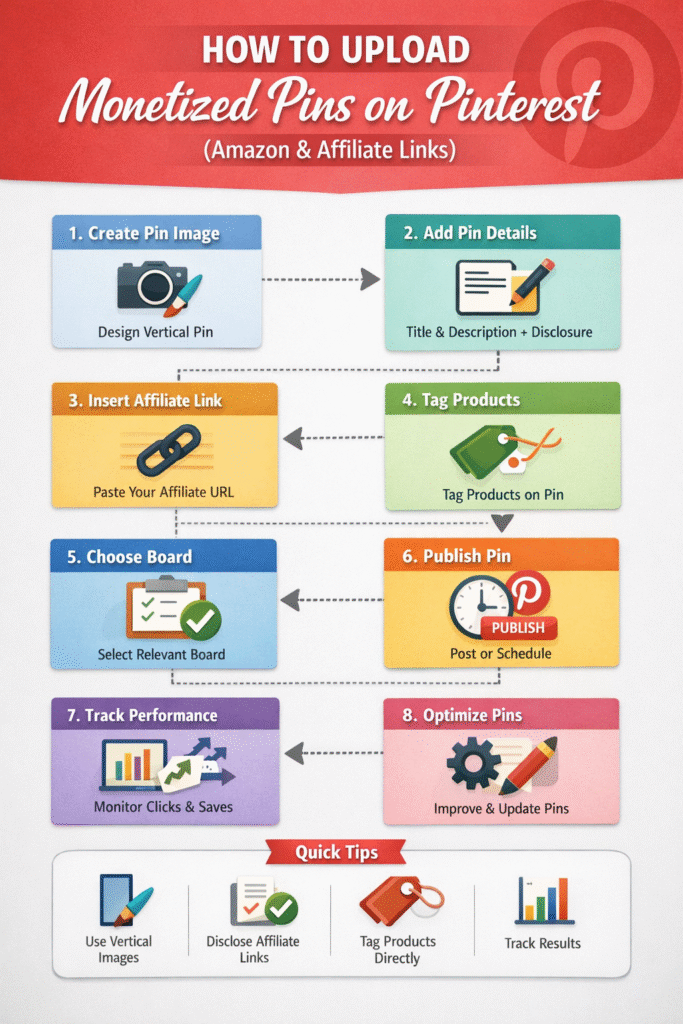
Step-by-Step Workflow: Uploading Monetized Pins on Pinterest
Step 1: Prepare Your Pin Image
- Use a vertical pin (2:3 aspect ratio, e.g., 1000×1500 px)
- Include text overlay for clarity (title or key benefit)
- High-quality visuals, branded colors, and clean fonts increase CTR
Tip: Canva or Adobe Express is perfect for creating pin templates.
Step 2: Start Uploading the Pin
- Click Create Pin → Upload Image
- Select the prepared image
Step 3: Add Pin Details
- Title: Use your main keyword + product description
- Example: Best Noise-Canceling Headphones 2026 – Amazon Deal
- Description: Include keywords naturally and add affiliate disclosure
- Example: “This post contains affiliate links. If you buy through this link, I may earn a small commission at no extra cost to you.”
Step 4: Add Your Affiliate Link
- In the Destination Link field, paste your Amazon or affiliate link
- Ensure the link works and goes directly to the product page
- Optional: Use a link shortener like Bitly or Pretty Links for cleaner URLs
Step 5: Tag Products (Optional but Recommended)
- Click “Tag Products” while uploading the pin
- Add the product name → paste the same affiliate link
- Tagged products are clickable directly on the pin image for easier conversions
Step 6: Select the Right Board
- Save the pin to a relevant board for maximum discoverability
- Ensure the board title and description match the pin topic/keywords
Step 7: Optimize Settings & Publish
- Check that all links are working
- Add relevant hashtags (1–3 max) for extra discoverability
- Hit Publish or Schedule for optimal timing
Step 8: Track Performance
- Use Pinterest Analytics to monitor:
- Impressions
- Saves
- Click-throughs
- Outbound clicks (your affiliate link)
- Adjust pin design or keywords if CTR is low
Quick Best Practices
✅ Always disclose affiliate links in description
✅ Use high-quality images with clear text overlays
✅ Tag products directly for interactive clicks
✅ Match pins to relevant boards
✅ Track clicks and optimize pins based on analytics
How to upload Monetized pinterest Pins
Using Alt Text for Pinterest Pins
Alt text (alternative text) is a short description of your pin image. It’s primarily meant for accessibility, but in 2026 it’s also a ranking signal for Pinterest SEO. Adding Alt Text is crucial because search engine crawlers cannot ‘see’ images; they rely on these descriptions to understand the content of your Pin, which helps your profile rank in both Pinterest and Google Image search results.
1. Why Alt Text Matters
- Accessibility: Helps screen readers describe your image to visually impaired users
- SEO Signal: Pinterest uses alt text to understand what the pin is about, improving search visibility
- Additional Keyword Opportunity: You can include relevant keywords naturally
📌 Think of it as a mini-description for Pinterest’s algorithm that complements your title and description.
2. How to Write Effective Alt Text
Best practices:
- Keep it concise: 100–200 characters
- Describe the image content clearly
- Include main keyword naturally
- Avoid keyword stuffing
Example for a Pinterest Marketing Pin:
“Step-by-step Pinterest marketing guide for bloggers in 2026 with tips for boards, pins, and SEO.”
Example for an affiliate product pin:
“High-quality noise-canceling headphones for working from home, available on Amazon.”
3. Where to Add Alt Text
- While uploading a pin: Alt text field is right below the description field
- Use unique alt text for each pin, even if the image is similar
- Combine it with a strong title and description for maximum SEO benefit
Quick Alt Text Checklist
✅ Include main keyword naturally
✅ Describe the image clearly and concisely
✅ Keep under ~200 characters
✅ Make each pin’s alt text unique
✅ Combine with optimized title + description
Conclusion: Master Pinterest Marketing in 2026
Pinterest is no longer just a social network, it’s a visual search engine, traffic driver, and revenue platform. By following the steps in this guide, you can turn Pinterest into a predictable source of blog traffic, leads, and affiliate revenue.
From setting up your business account, to optimizing boards and pins, to posting strategy, SEO, and advanced features, every element works together to amplify results.
The key takeaway: Pinterest success comes from structure, consistency, and quality—not random pinning or hacks. Focus on clear boards, high-quality pins, keyword optimization, and data-driven posting, and the results will follow.
Your Actionable Pinterest Checklist for 2026
✅ Convert to a Pinterest Business Account and claim your website
✅ Optimize your profile with niche-focused username and bio
✅ Create 5–8 high-quality boards with keyword-rich names and descriptions
✅ Save pins to relevant boards with strong titles, descriptions, and optional alt text
✅ Use vertical, branded pins with high-quality visuals or Canva templates
✅ Tag products directly for monetized pins (affiliate or own products)
✅ Follow a consistent posting schedule using standard, idea, and video pins
✅ Research and use short-tail and long-tail keywords for pins, boards, and profile
✅ Monitor Pinterest Analytics to track impressions, saves, clicks, and CTR
✅ Experiment with advanced strategies: Idea Pins, video pins, ads, automation, and cross-promotion
📌 Pro Tip: Start small, stay consistent, and iterate based on analytics. Pinterest rewards quality, relevance, and consistency above all.
Have questions about Pinterest Marketing or want personalized help? Contact me today and let’s grow your traffic together!

